Just as 4K became the standard for filmmakers and content creators, the industry shifted its focus to the next big milestone: 8K. Camera manufacturers market it as the ultimate upgrade, promising unbelievable detail and sharpness.
But for most creators, more pixels doesn’t always mean a better video. While 8K offers incredible specs on paper, it brings significant challenges to your workflow and budget. You need to know if those extra pixels will really improve your final product, or if they’re just an expensive luxury.
Let’s take a close look at the practical differences between the 4K vs 8K resolutions so you can decide which resolution is right for your projects.
Inside this article
What does 4K vs 8K actually mean?
Most people are familiar with 1080p, or full HD, which has a resolution of 1920 x 1080 pixels. For a long time, this was the broadcast standard and the best you could hope to achieve.
Then came 4K (UHD), which quadrupled the quality with a resolution of 3840 x 2160 pixels. It became the new gold standard for filmmakers and YouTube creators alike because of how much crisper and more detailed it looked.
Now, we have 8K. This sits at a massive 7680 x 4320 pixels. That’s four times the number of pixels in 8K and sixteen times the number of pixels in 1080p.
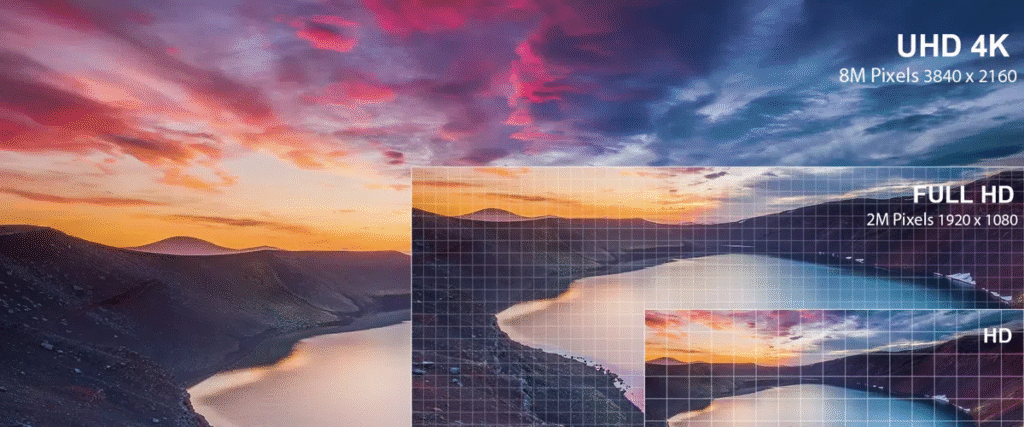
Here is a quick breakdown of 1080p vs 4K vs 8K and where they’re best used:
| Resolution | Pixel count | Best used for |
| 1080p | 1920 x 1080 | Social media, quick turnaround content, streaming. |
| 4K | 3840 x 2160 | YouTube, indie films, commercial work. |
| 8K | 7680 x 4320 | High-end VFX, theatrical releases (IMAX). |
However, it’s important to remember that resolution doesn’t necessarily equal quality. Yes, a high pixel count gives you a sharper image. But quality is also determined by bitrate, color depth, and compression. A 4K video with a high bitrate and 10-bit color depth will probably look better than a compressed 8K video with poor dynamic range.
What you’re really paying for with 4K vs 8K cameras
Before you rush out to upgrade your gear, there are a few things you can do to make sure your wallet survives the transition. The difference in camera capabilities between 4K and 8K is significant, but it’s also expensive.
Here are two things to consider:
- 8K often requires more expensive equipment. To resolve 8K properly, you might need higher-end lenses that are sharp enough to handle that resolution. Older lenses might look soft or blurry on an 8K sensor, meaning you often have to upgrade your glass along with your body. You also need significantly larger file storage solutions (think expensive CFexpress cards rather than standard SD cards) just to record a few minutes of footage.
- 4K cameras are now standard and more affordable. 4K has become the norm, even in smartphones. You can get incredible 4K quality out of a mid-range camera without breaking the bank, allowing you to focus your budget on lighting and audio, which often impact the final product more than resolution does.
Considerations to think about with shooting and editing in 8K
If you decide to pull the trigger on 8K vs 4K, you need to prep your workflow for the heavy lifting. Here’s what you are up against in the editing room:
- 8K file size is massive. If you think 4K footage eats up hard drive space, 8K is a whole new beast. You will need terabytes of SSD storage to hold the footage for each project.
- 8K requires a high-performance workstation. You can’t edit 8K on an average laptop. You’ll need more RAM, significant GPU power, and a processor that can handle playback at that resolution.
- Export options. Ironically, even if you shoot in 8K, most people still deliver in 1080p or 4K. This means your computer is doing a lot of extra work to downsample the footage for the final export.
8K requires a heavy investment in hardware, but there’s an easier way to get high-resolution content without buying a new computer. At Storyblocks, we offer a massive library of HD, 4K, and 8K video footage. You can download the resolution you need for your project without worrying about storing all of the raw footage.
What platforms actually support 8K?
Before you export that massive 8K file, you need to consider where your video is going. For instance, if you’re editing for social media, that extra resolution might just get compressed away.
Here’s a 4K vs 8K comparison, showing where each currently stands with the major platforms:
| Platform | 8K Support | What it really means |
| YouTube | Yes | YouTube supports 8K upload and playback, though very few viewers have the 8K monitors required to actually see the difference. |
| Vimeo | Yes | Vimeo supports 8K playback, but has the same viewer limitations as YouTube. |
| Instagram and Facebook | No | These platforms heavily compress files for video optimization. 1080p is the standard. Uploading 8K is generally a waste of bandwidth. |
| TikTok | No | TikTok is mobile-first. While you can upload high-res files, they are compressed down to 1080p. |
| No | LinkedIn video is generally capped at 4K (and often plays back at lower resolutions depending on bandwidth). | |
| Broadcast and TV | Rarely | The vast majority of broadcast TV is still 720p or 1080i. 4K broadcast is still an exception, and 8K is virtually non-existent. |
Ultimately, delivery resolution matters more than capture resolution for most creators. If 90% of your audience watches your content on a smartphone screen, uploading an 8K file is overkill. It’s better to focus on where your video will go, rather than the maximum specs your camera can hit.
When it makes sense to shoot in 8K (and when it doesn’t)
Just because you can shoot in 8K doesn’t mean you should. Trust your instincts and focus on creating content that people will want to watch. Here’s when to use 8K and when you should hold back.
YES for 8K:
- High-end commercial work. If you’re working on big-budget commercials, clients may demand 8K master files for their archives.
- Green screen and keying. More pixels mean more color data. This results in much cleaner edges when you are keying out green screens or doing visual effects work.
- Reframing in post. This is one of the biggest practical benefits. Shooting in 8K allows you to crop in significantly—turning a wide shot into a close-up—without losing any quality in a 4K timeline.
- Future-proofing cinematic content. If you want your footage to remain relevant for the next decade, capturing at the highest possible resolution might be a smart move.
NO for 8K:
- Social media videos. These platforms are going to compress your video aggressively. All that extra 8K detail will disappear the moment you hit upload.
- Standard YouTube content. Unless you run a hardcore documentary channel, the vast majority of your audience is watching on phones or laptops that can’t display 8K anyway.
- Mobile-first creators on a budget. The return on investment just isn’t there. The cost of the extra storage, lighting, and computer power required for 8K is better spent elsewhere.
Still on the fence? Ask yourself these three questions before you hit record:
- Am I delivering this to a client who specifically requested 8K deliverables?
- Do I plan to crop, zoom, or stabilize these shots heavily in post-production?
- Do I have the hard drive space and processing power to handle files this massive?
If you answered no to these, 4K is your best bet.
For now, 4K is still king
Unfortunately for tech enthusiasts, the benefits of 4K vs 8K video are still stronger for the vast majority of creators. It offers the perfect balance of quality, manageable file sizes, and accessibility.
It allows for faster uploads, smoother playback on timelines, and is natively supported on almost every modern TV and monitor.
If you’re creating anything from YouTube content to branded marketing videos and short films, 4K is the sweet spot for cinematic quality, fast turnarounds, and affordability.
It’s also important to note that consumer tech isn’t moving as fast as camera tech. 8K TVs are still a luxury item and unlikely to become standard in living rooms anytime soon. In fact, sales of 8K TVs peaked back in 2022, suggesting the market has yet to fully embrace the technology.
On top of that, rapid advancements in AI upscaling tools are making it easier to increase the resolution of older footage. In a few years, you may be able to turn your 4K master files into 8K without needing a RED camera.
Choose what’s right for you
At the end of the day, the best resolution is the one that fits your workflow, budget, and audience. There’s no prize for having the most pixels if it bankrupts your production or bottles up your editing process.
To help you make the final call, look at where you fit in.
- Content creators: If you are uploading content to YouTube, stick with 4K (or even 1080p). Consistency and speed of upload are more important than resolution. 8K will only slow you down, and your viewers on mobile devices won’t see the difference.
- Commercial filmmakers: If you’re shooting high-end commercials, 8K might be useful when used selectively. If your clients have the budget for storage and post-production time, then the extra resolution can be a powerful tool.
Whichever route you choose, we have the footage to back you up. The Storyblocks library is stocked with thousands of HD, 4K, and 8K clips for creators and brands of all sizes. Start your subscription today and get instant access to the footage you need to complete your next project.