You finally find the perfect piece of footage or song, and then notice one little detail in the license: attribution required. Now what?
Attribution rules can feel more complicated than they need to be, but giving proper credit is easy as soon as you understand what information to provide. In plain terms, creators have a right to be credited as the author of their work. If you use their work in your projects, you need to announce it.
Below, you’ll learn what the right of attribution means, how to check a license before using an asset, and how to give proper attribution when you need to.
What is the “right of attribution”?
The right of attribution is the right of every creator to be credited as the author of their work (or, to choose not to be credited in some cases).
Attribution isn’t the same as copyright ownership. It’s about giving credit to the creator, but it doesn’t necessarily mean you’re paying them or asking their permission to use it. You’ll still need to check the copyright and licensing terms that apply to the work beforehand.1
You’ll encounter attribution across many different industries, including stock photography, music, stock footage, open-source code, and even academic writing.
For creators, getting attribution right is crucial if you want to avoid takedowns, legal claims, or losing access to a platform or library. If a creator’s license makes attribution a condition of use, failing to provide credit means you’re no longer complying with the license. That’s why it’s always worth checking before you publish.
Why attribution is sometimes required for content (and sometimes isn’t)
The easiest way to understand attribution is to think of it as a content licensing condition, rather than a universal rule that applies to every piece of content. Every asset’s license sets its own rules for use.
Some free stock resources let you use their work at no cost for a simple trade-off: you agree to credit the creator. The creator gets visibility and recognition for making it available, and you get access to the asset. Think of it as getting a discount in exchange for a shoutout.
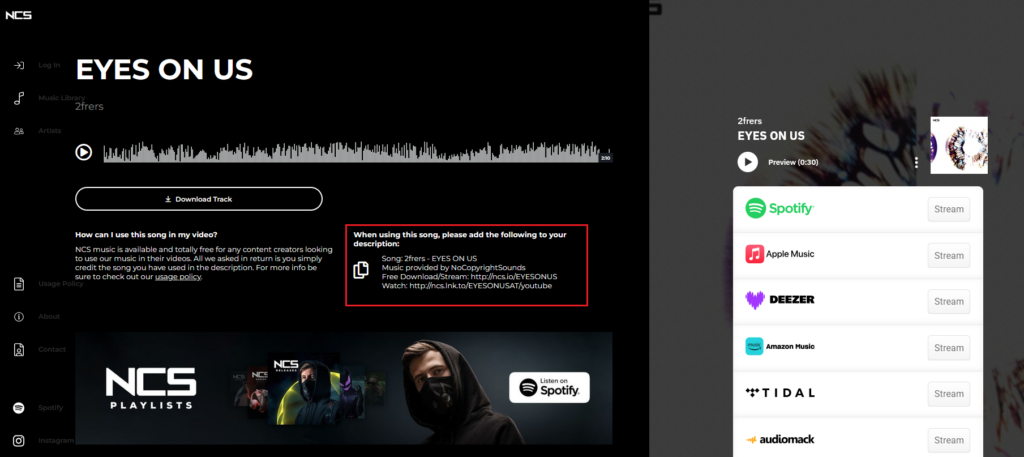
Here’s an example from the NCS stock music library, where each track clearly states the attribution policy and includes an easy “click to copy” description for you to add to your video:
In contrast, most paid or premium licenses (like typical stock library subscriptions) often build in the cost of that credit into the price, so no attribution is required. Instead, you have to pay upfront.
Creative Commons attribution requirements
Creative Commons is the attribution framework you’re likely to encounter the most. It offers six copyright licenses, from four conditions:
- Attribution (BY): You must give appropriate credit.
- ShareAlike (SA): Adapted versions must be shared under the same license.
- NonCommercial (NC): You cannot use the work commercially.
- NoDerivates (ND): You cannot distribute modified versions under the license.
Each of the six possible license types have attribution requirements, as shown by the following table:
| License | What it allows | Attribution required? |
| CC BY | Use, modify, and use commercially. | Yes |
| CC BY-SA | Use and modify. Adaptations must use the same license. | Yes |
| CC BY-ND | Use, including commercially, but don’t distribute adaptations. | Yes |
| CC BY-NC | Use and modify for noncommercial purposes. | Yes |
| CC BY-NC-SA | Noncommercial use and adaptations under the same license. | Yes |
| CC BY-NC-ND | Noncommercial sharing only. No adaptations. | Yes |
The only exception is Creative Commons Zero 1.0 (CC0), which places the asset in the public domain and waives the right to require attribution. Nevertheless, even with CC0, giving credit can still be good practice.
How to check if attribution is required for a piece of content
To check whether attribution is required, work through this checklist:
- Find the specific license attached to the asset: Look for a license badge on the page where you downloaded the asset. Look for terms like CC BY 4.0, “Standard License”, or “Personal Use Only”. Most stock sites like Flickr and the YouTube Audio Library will label this clearly.
- Understand the license’s requirements: Once you’ve found the license, search its terms for anything related to attribution, credit, or copyright. Look for a specific description of permitted uses.
- Check for a “credit line” or “suggested attribution” field: Many platforms auto-generate the exact wording you need, including the title of the work, original source, the license, and a link to the creator.
When in doubt, check the platform’s FAQs or licensing page directly, or contact the creator themselves.
And finally, never assume that a royalty-free asset is attribution-free. If you download royalty-free music, it means you aren’t required to pay per use, but it says nothing about whether or not you need to credit the creator. How to properly give attribution (the TASL method)
To make sure you’re giving proper attribution, using the TASL method—Title, Author, Source, License—is best practice.
Here’s what to include:
- Title: The name of the work, if one is provided.
- Author: The name of the creator or licensor. When possible, link their name to their profile, website, or original page.
- Source: A link to where you found the original work. This helps people trace the asset back to its original location.
- License attribution: The name of the specific license that applies to the work, ideally linked to the license terms.
Take this example image, shared by the user funcrush28 on Flickr:

The best attribution according to the TASL method, is: “sunset” by funcrush28 is licensed under CC BY 2.0.
Where should attribution go?
There is no one universal place to put attribution. It depends on the type of project and the platform you’re publishing on. Here’s a quick guide:
- Video: Add credit in the video description, end credits, or another clearly visible location. Here’s how to license music for YouTube in order to avoid copyright strikes.
- Articles and blogs: Add credit near the relevant image or include a credits section at the end of the article.
- Podcasts: Include attribution in the episode description or show notes.
- Social media: Include attribution in the post caption or a pinned comment.
The goal is to make the credit visible and easy to find. If the license gives you specific instructions about where attribution must appear, follow those instructions first.
Common attribution mistakes to avoid
Here are some of the most common attribution mistakes to watch out for:
- Assuming “free” means no attribution is required. Free to download and free to use without credit are two different things.
- Only linking to the source. A URL by itself may not tell people who created the work or which license applies.
- Leaving out the license. If attribution is required, include the specific license whenever the license terms call for it.
- Forgetting about adaptations. If you edit, remix, crop, translate, or otherwise modify a work, check whether the license has additional requirements for adapted versions.
- Hiding the credit. Attribution should be reasonably visible and accessible rather than buried somewhere viewers are unlikely to find it.
- Using personal-use content commercially. An asset that is free for personal projects may not be cleared for advertising, licensed for client work, or okay to use in other commercial uses.
If you’re unsure, go back and check the license to save yourself from having to fix it when you receive a take-down notice.
Common attribution FAQs
Is attribution the same as copyright?
No. Attribution means giving credit to the creator, whereas copyright determines who owns the work and what you can use it for.
Do I need attribution for royalty-free content?
Not necessarily, but always check. Royalty-free just means you don’t have to pay a royalty every time you use an asset, but the license may still require attribution. Learn about the difference between royalty-free and copyright-free.
What happens if I forget to give attribution?
You may no longer be complying with the license, and that could lead to losing permission to use the asset. In some cases, you may receive a take-down or other legal claim against you. If you realize that you missed attribution, correct the credit as soon as possible.
Do I need attribution for AI-generated content?
AI-generated photos, videos, and music can cause endless headaches for creative teams. It cannot, at the time of writing, hold copyright, is considered authorless, and in most cases will not require attribution. However, clearly labelling AI content is recommended. Learn more about the hidden risks of using AI-generated content.
What does attribution required mean?
Attribution required means you must credit the creator of the asset if you use it in your projects.
What does no attribution required mean?
No attribution required means that you can use an asset without crediting its creator, as in the case of assets in the public domain.
Never worry about attribution with Storyblocks content
Attribution is ultimately about giving creators the recognition they’re entitled to under the terms of their license. Before using an asset, check its license, understand what it requires, and follow the attribution instructions provided.
But attribution shouldn’t have to slow down your creative process.
With Storyblocks, you don’t need to provide attribution when you use our content. Our straightforward licensing means you can find the content you need, download it, and get back to creating—without worrying about attribution at all.
Our library is 100% human-made, and every download directly supports the creators behind the content. Sign up today and create with confidence while supporting the people who make the content possible.