If you ever caught yourself scrolling through videos on mute, you’re not alone – in fact, your audience is doing the exact same thing. A majority of people say they frequently watch videos on mute, which is why video captioning is a massive engagement opportunity. But many creators miss out because they don’t fully understand the importance of subtitles.
This article will outline why captions are important, enhancing accessibility and reach, and why skipping them can actually hurt your content. We’ll also cover some best practices for making your captions work even smarter.
Why captions matter more than ever
Websites, social media platforms, and even some web browsers nowadays default to auto-playing videos on mute. It’s primarily a way to put more control in the viewer’s hands and avoid annoying them (or those around them) with any sudden jarring sounds.
Audiences seem to like it. A study by ad tech firm Sharethrough found that 75% of people say they often watch videos on mute. Depending where our day takes us, we’re not always somewhere that it would be convenient or socially acceptable to watch a video with sound on. Watching videos on mute often happens in public places or while a viewer is in bed with a sleeping partner or baby.
A study by Verizon and Publicis found that 92% of consumers watch video with the sound off on a regular basis, and the trend is similar across social media platforms. Eighty-five percent of Facebook video is played without sound, as well as 80% of LinkedIn videos, and 40% of Instagram videos.
For creators and marketers, skipping captions means lost engagement from a solid majority of viewers, which can hurt your chances of algorithms like YouTube’s recommending your content.
Accessibility helps you reach a bigger audience
There are a lot of compelling reasons to caption your videos, and accessibility is one of the biggest. Making your content more accessible helps you reach a wider audience, including those who depend on video captioning to fully engage with it.
The Centers for Disease Control and Prevention (CDC) says 1 in 20 Americans has some form of hearing loss. That’s 17 million people. Captions not only make video content more inclusive, adding them ensures compliance with accessibility standards.
Captions are also helpful for non-native English speakers to help improve their language comprehension skills. Reading captions alongside hearing the voiceover make it easier to grasp the subtle nuances of a language they may be trying to learn.
Captions boost engagement and retention
Adding subtitles and captions boost both engagement and retention. A study by Facebook-parent Meta shows they even lead to increased view time on video ads by an average of 12%. Increased viewing time means more audience engagement, which in turn results in better algorithm reach, ultimately resulting in their videos getting a wider audience.
Watching video with captions also transforms the experience for audiences, which is another element of the importance of subtitles. Research has shown that captions improve comprehension and help audiences better absorb information. They also have been shown to enhance viewer recall and even brand awareness.
Ensuring you’re maximizing your comprehension and recall is especially valuable for tutorial or educational content. With videos geared toward teaching a skill, the audience will get more out of them the more they’re able to remember and comprehend what they just saw.
On top of everything else, adding captions help give your video an SEO lift as the text transcripts can be indexed by Google. Showing up in Google results, or even being recommended by ChatGPT, gives you a better shot at substantially beefing up your view count. You’ll also be able to reach a much wider audience and draw significantly more viewers than the channel where you initially posted the content.
Auto-caption features make it easier than ever
Social platforms have developed their own built-in tools that make it easier for creators to reap the benefits of adding captions. Captions are generated using AI-based software, which “listen” to the audio on your videos and produce a transcript.
Auto-captioning can be done in a fraction of the time a human transcriber would require to perform the same task. However it is strongly recommended that you read over any auto-generated captions to scan for any obvious errors.
YouTube offers auto-generated captions in dozens of languages, with the ability to correct any mistakes. YouTube offering automated captions in so many languages opens your videos up to audiences who speak other languages through translation, which further broadens your videos’ reach.
Instagram Reels/Stories let users automatically transcribe audio and display it on a video, including the option to edit for accuracy and other customization options.
TikTok has offered auto-generated captions for years, giving users the freedom to edit transcriptions while providing additional personalized text tools.
Facebook turns on auto-generated captions by default for its videos and video ads, and are available in 10 languages. The platform provides tools for editing text after its tool transcribes the audio.
LinkedIn gives members the ability to automatically add video captioning across both desktop and mobile, with the option to review or edit the captions before publication.
Video editors like Adobe Premiere Pro and DaVinci Resolve Studio also offer automatically generated subtitles. This makes it extremely convenient to make integrating captions part of your post-production editing workflow.
Best practices for effective video captioning
Even though adding and editing captions is easy to do, following a few best practices will ensure you and your audience get the most out of it. Where your captions go on the screen, how they appear, and how easy they are to read can all impact their effectiveness.
Formatting tips
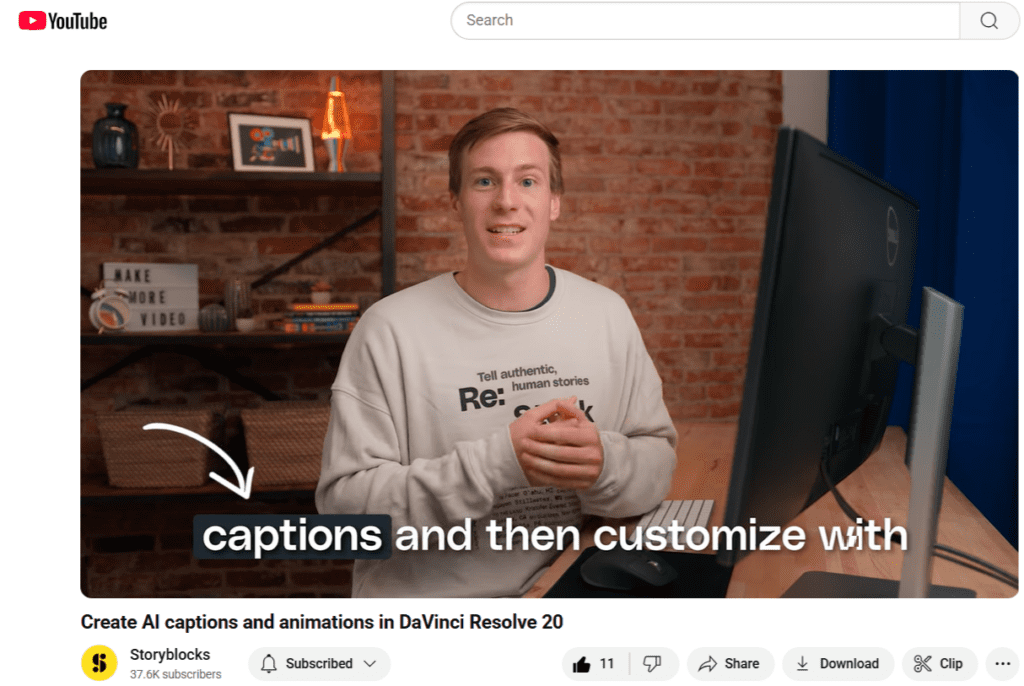
Placement: Avoid putting captions in a place that will obscure key visuals. Typically the bottom-third of your video is a good spot to aim for.
Size: Captions should be readable no matter whether your viewers are watching on mobile or desktop. Fonts should be sized between the equivalent of 16-22pt to ensure maximum readability.
Style: Contrasting colors and sans-serif fonts help improve legibility, as can adding an outline to your text.
Last but not least: Always review any auto-generated captions for accuracy, punctuation, grammar, etc. The technology has come a long way and is easier than ever, but ensuring perfection still requires a good old-fashioned human editor.
Captions are no longer optional
Adding captions to your videos is no longer optional – it’s an essential tool that casts as wide an audience net as possible. Skipping captions not only reduces your reach, it can undercut the impact of your content. You create videos for a reason, so why wouldn’t you strive to reach the most people you can with the greatest impact possible?
Captions and subtitles done right make it easier for audiences to absorb, retain, and comprehend videos. They’ve also been proven to make it easier for people to digest spoken-word content.
Start building the habit of captioning your videos now, and before long it’ll become second nature. With watching videos on mute now commonplace, captions are a great way to grab your audience’s attention and maximize their engagement with your content.
Maximize your video’s engagement by pairing captions with high-quality content from Storyblocks. With one subscription, you get unlimited downloads of over 10 million high-quality stock footage clips, customizable video templates, royalty free music, images, and more. Sign up today to start downloading and making better video, faster than ever.