
Finding the right assets for your project just got a lot easier. With the new Storyblocks MCP and Claude or ChatGPT, there’s endless possibilities for how you can automate, streamline, and simplify your creative process when it comes to video production.
In this tutorial, we’ll walk you through five different ways that you can use the Storyblocks MCP inside your favorite AI assistant to help streamline your creation process.
Table of contents
What you can do with the Storyblocks MCP Server
The Storyblocks MCP Server connects with both Claude and ChatGPT to bring our entire human-made library inside your AI workflow. So instead of having to go to Storyblocks to search for or download pre-licensed footage, music, sfx, or other stock assets, you can stay in-flow with your AI tools.
For creatives who are already using either of these AI as a part of their creative process, this gives you new ways to streamline your workflow. Whether you do it yourself or use an AI agent, there’s tons of ways you can take advantage of the Storyblocks MCP to help save you time.
5 ways to plug the Storyblocks MCP into your AI workflow
1. Running multiple searches at once
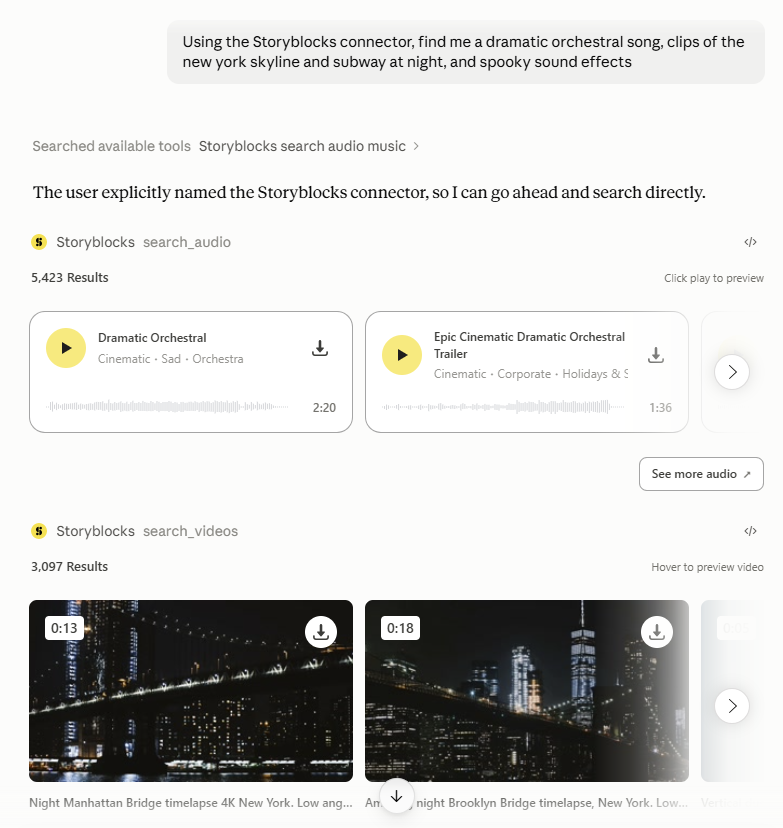
One great thing that the Storyblocks MCP makes possible is batch searching the library. Whether you’re looking for a few different footage clips, or stock assets across different content types, you can easily send one message with multiple requests and have results pulled for each one so you can browse and download as you go.
Right now, batch searching isn’t available with Storyblocks’ on-site search or with conversational search – this is something that you can exclusively unlock with the MCP. Running multiple searches at once helps speed up the process for finding all the assets you need, along with being more flexible in the language you can use to find those assets, since Claude and ChatGPT can interpret your request to find relevant keywords.
2. Suggest shots or clips based on a script
If you’ve finished the scripting process for your video, an easy way to help streamline pre-production is to have your AI tool review your script and suggest b-roll using the MCP that you can add into the video. With your request, it can be helpful to note what scenes you already have a-roll or footage for, so that Claude or ChatGPT doesn’t waste time suggesting assets there.
Adding a description for the kind of b-roll you’re thinking of using in your script can also help speed up the process. Our free video script template is designed to include visual notes and references, so that you can keep all of the important information about your video in one place.
Depending on the length or complexity of your video, it may be helpful to break up these requests up by specific scenes or parts. That way, you’re not getting a ton of results at once to review, and can more easily refine your results as needed.
3. Plug in footage to a storyboard
If you’re storyboarding a video or project and plan to use stock video or footage, the MCP can easily help you speed up your search. Similar to finding assets based on a script document, you can add or paste in your Storyboard to ChatGPT or Claude and ask it to find clips from Storyblocks that best match up with each of your individual shots or panels.
Of course, not everyone has the same approach to storyboarding – so how well this works on the first go will depend on a few different factors. If your storyboards are solely images, without any notes or descriptions, you may have to spend more time refining results to get the shots you’re looking for.
And then there’s how detailed your actual frames are. Some people do minimal sketches, some do detailed drawings, and others use reference images. The last two will most likely return better results than the first, since ChatGPT or Claude may have a hard time interpreting your sketches.
If you want to use the MCP to help bring your storyboard to life, it’s worth doing the work beforehand to make it as detailed as possible. Whether that’s in the frames themselves or including notes to help explain your vision, it’s better to have more information for your AI tool to use than less.
4. Suggest assets based on your own file or content
Features like our Search Similar or Search by Sound are great ways to help you find content in our library that’s like another asset or file. But with the MCP, you can use Claude and ChatGPT’s advanced capabilities to help you find stock assets in our library that are similar to an image, video clip, audio file, and more.
You can also mention content by name if you don’t have the actual file – like asking Claude or ChatGPT to search the Storyblocks library for a song that’s similar in vibe to one from a well-known artist.
Let’s say you have an idea in your head for the kind of b-roll clip you want to use in a video based on a photo you’ve seen or taken. In Claude or ChatGPT, you can add that photo to a new conversation and ask it to find similar results for footage in the Storyblocks library using the connector. Your AI assistant will then analyze the image and search our library based on keywords or concepts it pulls from that analysis.

To get the best results on your first go, it helps to specify what about the image you want the footage to include. For example, when I added the image above to my prompt, it pulled two different visuals from the image – a senior man next to a fireplace and a behind-the-scenes film crew. Then it showed results for each of those concepts, since it couldn’t find clips that had both.
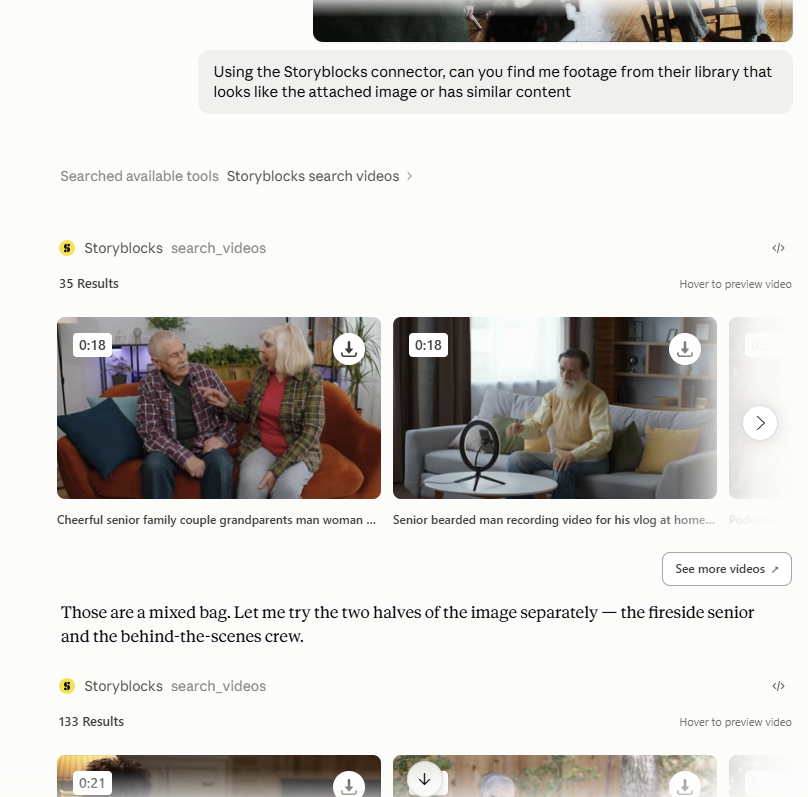
If I had specified that I was looking for footage that showed a camera crew behind the scenes in my initial prompt, that would have helped streamline the process. But you can always refine your results by adding more specific detail into your conversation.
5. Periodically pull the newest assets for a specific search
If you’re someone who uses specific kinds of assets on a regular basis, the MCP can help you stay on top of the latest additions to our library based on specific searches.
Let’s say, for instance, you’re a content creator who reports out on the stock market. Most likely, you have a folder of stock market related b-roll on hand for all your edits, and a list of keyword searches for footage you use consistently.
Instead of having to manually check those searches to see if new clips have been added, you can task an AI agent to run those searches for you on a regular basis (weekly, bi-weekly, monthly, etc.), and ask it to notify you of any new results it finds.
This will work best if you check your search on the Storyblocks site first, sorting results for your query by Most Recent. Then, your AI assistant can use the title of the first asset that shows up there as your benchmark for the latest new result you’ve seen. So your request could look something like “Search for [term] in [stock content type] on Storyblocks by most recent and see if any new content has been added – the last new asset I saw was [name of most recent asset].”
Then, you can either review and choose which ones to download, or just have your agent download all new options into a designated folder. So when you sit down to edit your next video, you have new b-roll options available right away.
Get started with Storyblocks today
These are just some of the ways you can leverage the MCP to help improve your creation process and save time, but the possibilities are endless. The Storyblocks MCP unlocks even more flexibility when it comes to making the most of our 100% human-made, pre-licensed stock library.
With a Storyblocks subscription you can unlock the MCP, unlimited downloads of over 10 million high-quality stock assets, and even more time-saving tools to support every stage of production. Explore our plan options and sign up today to get started.