5 video workflow bottlenecks creative teams face – and how to fix them
Creative teams everywhere are stuck in a tug-of-war. On one side: the demand for more video, faster than ever. On the other: the creative instinct to slow down, refine, and protect their craft.
Lean too far one way, and you burn out your team. Lean too far the other, and you miss deadlines, drain budgets, and lose relevance.
The truth is, this debate rarely gets solved outright. Instead, it seeps into workflows, where competing priorities create bottlenecks that slow teams down.
The good news is that bottlenecks are predictable. And if you know where to look, they’re fixable.
In this guide, we’ve pulled together five bottlenecks video pros wish they’d addressed sooner. You’ll hear from:
Chris Lavigne, Head of Production at Wistia
Kyle Miller, Video Production Manager at Storyblocks
Tyler Lessard, CMO Technology Advice and former CMO at Vidyard
Mike LaHood, Lead Video Editor at Freethink
Maggie Linder, Director of Studio Operations at Freethink
They share how they identified bottlenecks, how they fixed them, and what their processes look like today. The advice in this guide will help you build creative workflows and produce video faster while maintaining morale.
The 5 common bottlenecks
These bottlenecks don’t sneak in because teams lack talent. They creep in because of our all-too-human blind spots.
Left unchecked (or undetected), these small cracks can easily develop into wide-scale problems. Thankfully, each one has a pattern you can spot — and a fix you can implement before it costs you time and money.
Bottleneck
How it shows up
The fix
Pre-production chaos
Scripts aren’t locked in, details slip through the cracks, projects spiral in post
✓ Finalize the script by scheduling a decisive review before production begins ✓ Give every project a North Star to guide it ✓ Run a checklist ✓ Document the workflow
Too many cooks
Feedback loops drag on, projects lose energy and momentum
✓ Define roles ✓ Limit who weighs in ✓ Set guardrails for reviews
Disorganization halts projects
Files scattered, no central plan, vision gets lost
✓ Centralize platforms ✓ Set kickoff expectations ✓ Adapt workflows to project needs
The ‘good-fast-cheap’ triange
Deadlines, budget, and quality goals clash
✓ Decide your priorities early ✓ Set quality thresholds ✓ Gauge urgency before you invest in speed
Disconnected freelancers
Disjointed handoffs, extra rework, missed alignment
✓ Treat freelancers like teammates ✓ Use structured kickoffs ✓ Teach through feedback ✓ Invest in long-term partnerships
1. Pre-production is where bottlenecks begin (or are prevented)
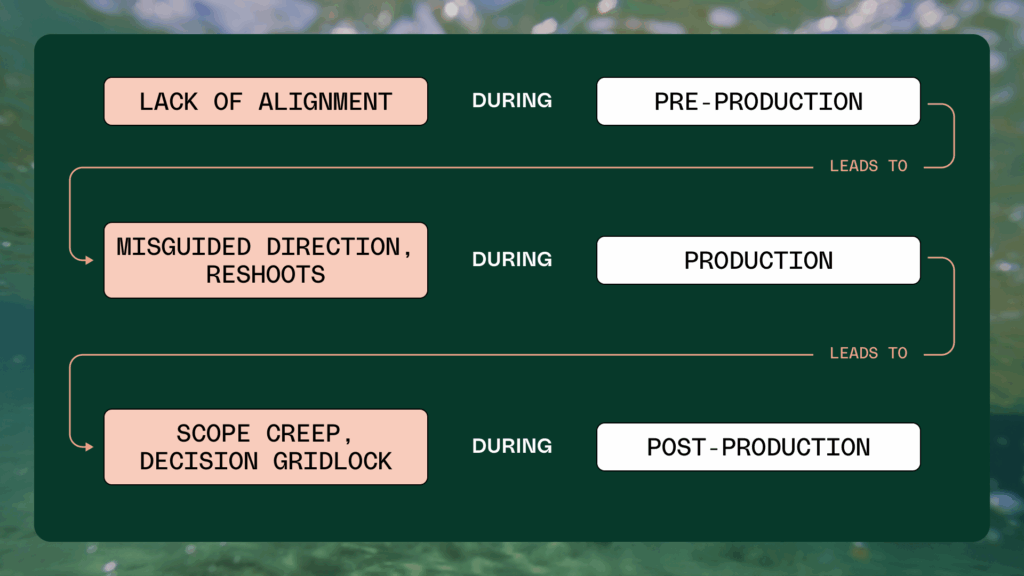
Ask anyone who’s lived through a video project gone sideways, and they’ll tell you: the trouble usually starts long before the cameras roll. Pre-production is where bottlenecks either creep in quietly or get cut off fast.
Chris learned this the hard way. Once on a project, his team spent too many shoots chasing moving targets because scripts weren’t truly locked before production. With non-actors (his colleagues) taking time out of their day to be on camera, reshoots were painful and demoralizing.
“We learned early to scrutinize the script and take a ton of time in the pre-production process, making sure the right stakeholders weigh in, at the right times, and that has proven to be very valuable time spent for us.”
Kyle remembers one project from a long time ago that collapsed completely because they skipped pre-production strategy: “The scope crept on us during concepting. We went straight into filming without a storyboard or plan, and it became so disorganized that the editing lift was greater than the idea itself. The project ultimately had to be scrapped.”
For Maggie, one project that should have been straightforward ended up spiraling. What could have been fixed in a minute before the shoot ballooned into hours of frustration post-production.
“I can recall one project that took ten times the amount of time to prep for an editor simply because the settings weren’t aligned before the shoot. It’s amazing how those little checks can save you.”
The takeaway?
Pre-production bottlenecks sting because they set off a chain reaction that drags whole projects off course. Avoid them by building habits that stop problems early.
It makes sense to spend the time in pre-production to really get the script right, making sure the right stakeholders weigh in. That workflow is not totally foolproof, but it creates a working blueprint that saves time.
Chris Lavigne
Head of Video Production at Wistia
Give every project a North Star.A single goal or guiding idea keeps every decision aligned and prevents scope creep.
“The most important thing is getting clear on that logline up front. It could be very, very specific, or it could be a little broader, but you have a North Star that every decision can be based on, after that.” – Kyle
Build a technical checklist. This ensures the basics don’t derail the edit.
“The extra 60 seconds to check something can save you 10x the hours in post production.” – Maggie
Document the workflow early. Documenting helps stakeholders understand the decisions and systems that went into the project. It also creates a reference base for all similar projects to come so you’re not starting (or fixing) from scratch every time.
2. Too many cooks spoil the shot
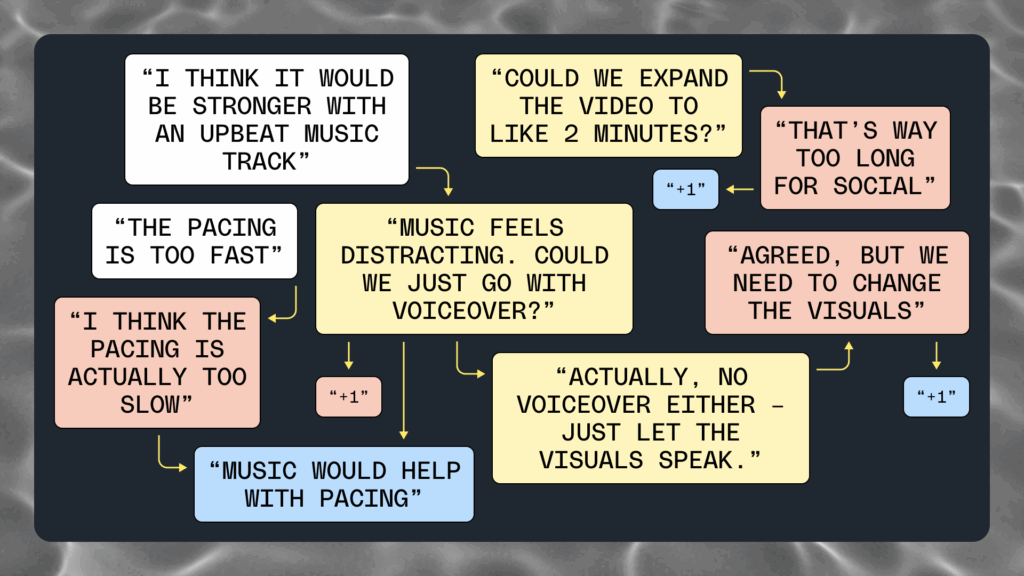
With every extra handoff and round of feedback, projects drift away from their original intent. What started as a clear idea gets diluted by competing opinions, and energy drains from the team just when momentum is needed most.
Chris has seen firsthand how projects unravel when too many people weigh in without context. He described a common scene: a script is passed around for feedback, but not everyone reading it can imagine the final video. Some latch onto personal preferences, others flag things that aren’t problems at all. And suddenly, the project is buried under competing visions.
As Chris puts it, “You want to include the right people, but don’t open it up to too many — everyone has different tastes and ideas. Then your workflow gets totally dismantled because people are giving feedback without all the information.”
Tyler watched Vidyard’s review process stretch out over weeks as scripts bounced from marketers to copywriters to design and video leads, only to circle back again for more notes. Every extra handoff chipped away at the sense of urgency. By the time the “final” version rolled around, what should have been a quick-turn social video felt lifeless.
He summed up the cost bluntly: “By the time the final reviews came around, some folks had lost a passion for the project. [Endless revisions] can lead to frustration, a team morale hit, and lower quality output.”
The takeaway?
Be deliberate about who you invite, what they review, and when they see it. Fewer voices and clearer roles make for workable timelines and stronger videos.
“If someone is an expert in messaging, they don’t need to be making design choices. As the creative team, you should have the ownership to ultimately make the final decision. Outlining what feedback is needed from the different stakeholders is important. When sharing a version for review, you can tag a specific person and say, ‘Please leave feedback regarding X, Y, and Z.” – Kyle
3. Disorganization halts projects
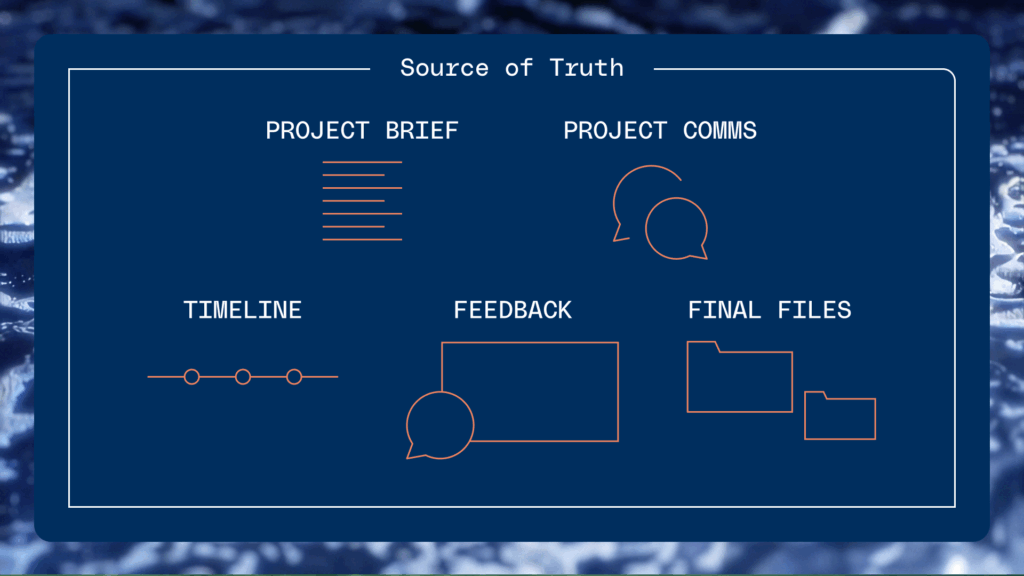
Projects don’t just stall because files are scattered or tools don’t talk to each other. They stall because no one’s sure what the vision is, or where the latest version lives. Without a single source of truth and a shared map of where the project is headed, even simple videos balloon into confusion.
At Vidyard, Tyler saw how inefficiencies crept in without a common process and when they tried to scale production, launches slowed to a crawl. His team only broke through when they streamlined the workflow onto one platform.
“Implementing a centralized platform for video content ideation, production and feedback was a huge win. It allowed our team to become more collaborative, faster to create, and much more efficient in our video creation processes.”
Mike underscores the point that clarity pays off: “The types of workflow that we’ve developed over the years and evolved have had their trade-offs, but what they pay back is time and ease of use.”
Even when experimenting with new workflows, the goal is the same — make processes predictable and easy to follow so editors aren’t bogged down.
The takeaway?
When everyone works from one source of truth, speed and quality multiply. Centralize your systems, define your roles, document repeatable timelines and let clarity do the heavy lifting.
Streamline feedback into one channel. Consolidating feedback in one place keeps the team aligned and motivated.
“Workflow inefficiency doesn’t just reduce your output. It leads to frustration, complacency, and often a morale hit that shows up in lower quality content or outcomes — despite the team putting in more time and effort to deliver.” – Tyler
Remember that solidifying your workflows doesn’t mean adopting a cookie-cutter approach. You can create multiple workflow variations that work for different types of projects.
The workflow that we use for an interview-style videos is different than what we do when we’re doing a feature film or something we’re cutting for a theater. Choosing documented workflows for different flavors of projects is an efficiency multiplier.
Maggie Linder
Director of Studio Operations at Freethink
4. The ‘good-fast-cheap’ triangle catches up with every team
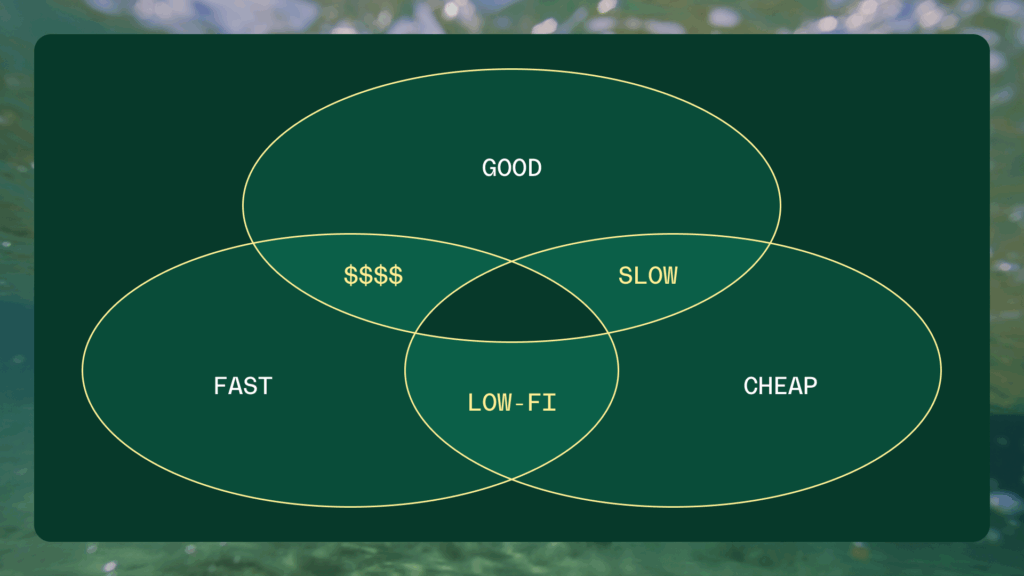
Every creative team encounters the good, fast, or cheap triangle where they can only pick two. It sounds like a cliché until you’re mid-project, balancing deadlines, budget, and quality standards.
For Chris, this tradeoff shows up in nearly every production. The trick is to weigh the context: not every video demands the same polish, and not every project can afford the same time investment.
“At Wistia, we like to move fast and keep costs lean, which means some projects land at about 80% quality. Every brand has to decide its own balance of quality, scrappiness, and cost before a project starts.”
Kyle agrees the triangle holds true: “I’ve found myself in this triangle multiple times. If you want speed, you’re gonna need to pay for it in one of two ways: either hiring really, really good talent, or you pay for it in strong workflow processes and clearly defined standards.”
The takeaway?
You can’t escape the triangle — but you can decide how to play it. Set expectations early, know which two variables matter most, and build your process around them.
Know your brand’s threshold for quality. Every company has a different standard for when “good enough” is truly good enough. Being explicit about that saves endless second-guessing.
Decide your priorities before you start. Tradeoffs don’t have to be painful if everyone understands them up front. Clear priorities can help you prevent conflict later.
5. When freelancers aren’t integrated, the internal team suffers
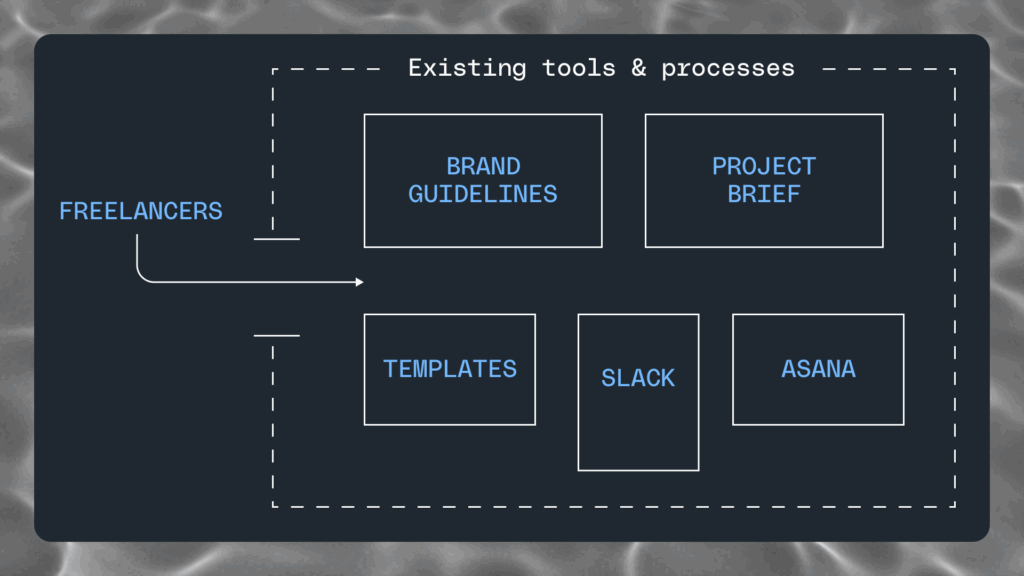
Video teams everywhere lean on freelancers to fill skill gaps and handle overflow. But the difference between a seamless extension of your team and a disjointed handoff is integration. Bring them inside your systems, and they can move as fast as your in-house team.
Chris solved this by treating freelancers like colleagues, not vendors. Instead of providing top-down instruction, Chris looked for self-starters who could slot naturally into the team’s workflow.
“Our retainer freelancers feature frequently in our workflows. They have access to a lot of our Slack rooms and our Google Suite.”
Kyle also relies heavily on freelancers, with six to seven across different parts of production. For him, structure matters more than access. He uses kickoff calls to align on ideas, documentation guides, and feedback that teaches instead of micromanages. That way, each project becomes smoother than the last.
“When you work with freelancers consistently, you’ll keep running into the same problems unless you teach and provide resources. Kickoff calls and clear documentation make sure everyone’s aligned before the first draft.”
The takeaway?
Freelancers aren’t plug-and-play. The more you integrate them into your systems and set them up with structure, the faster they’ll become true extensions of your team.
Treat freelancers like teammates. Access builds trust. Give them the same tools and channels as in-house staff, and they’ll operate at the same speed.
Use kickoffs to align early. A kickoff call is the fastest way to prevent misfires. It ensures everyone starts from the same vision before work begins.
Build feedback that teaches. Good feedback fixes the work in front of you. Great feedback prevents the same issue from popping up again.
Invest in long-term partnerships. Reliability compounds over time. Retainer relationships create familiarity, speed, and trust that one-off gigs can’t match. And when deadlines tighten, those freelancers already know your brand well enough to deliver without hand-holding.
The fastest video teams aren’t perfect – they’re intentional
Creative workflows say more about a team’s culture than any mission statement. Do you trust freelancers enough to give them access? Are boundaries set so feedback is constructive, not chaotic? Do you value pre-production even when no one’s watching? These choices add up.
The teams that move past bottlenecks are intentional. They decide what to prioritize, where to place guardrails, and which tools give them the most leverage.
That’s why so many brands and businesses trust Storyblocks as an essential part of their workflow, with 85% of teams saying they produce more video after switching to Storyblocks. From our professional-quality content library that’s curated and refreshed daily to help teams find the right assets fast to our enterprise-grade licensing that prevents delays and mitigates legal risk, we help teams streamline production every step of the way.