Choosing the right template for your project from the thousands of options available can be a daunting task. If you’re stuck in analysis paralysis, don’t fret—there’s a simple way to narrow down your options and simplify the selection process.
In this guide, you’ll learn how to think clearly about your project, platform, and requirements before choosing the perfect template.
If you already know what you’re looking for and simply aren’t sure where to start, Storyblocks’ library is packed with professionally made templates that span every category from marketing to documentary to social. Take a quick look to find the perfect template as you read.
Inside this tutorial
Why the right video template matters
The right template for your video matters because it saves you editing time and keeps your branding consistent. Viewers won’t be distracted by elements that don’t fit with your typical style, and you’ll be able to get your message across more clearly.
While they’re often easy to customize, the point of a template is to save you from too much manual work. Customizing the wrong template to fit your project is a time sink worth avoiding, especially when another template would have fit with far less effort.
How to choose the right template
You can choose the right video editing template by narrowing down your software requirements and finding options that match your project’s style. Here’s what to do.
1. Make sure it’s compatible with your video editor
The first step is to limit your search to compatible templates, since not every template works with every video editing app.
In most places, including Storyblocks’ library, you can filter search results for templates for Adobe Premiere, After Effects, DaVinci Resolve, and Apple Motion. Ticking your editor in the search filters will prevent incompatible templates from appearing.

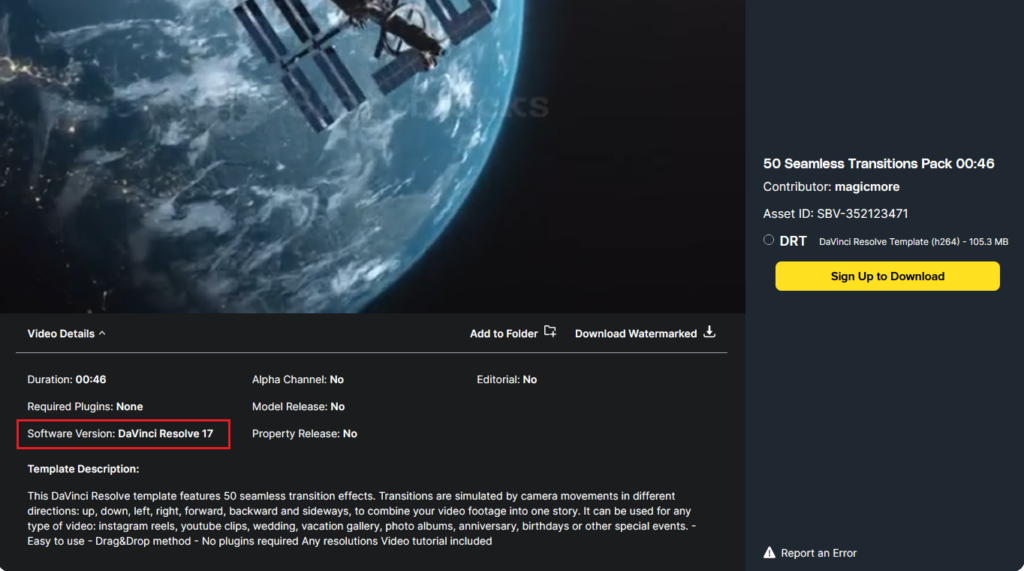
Once you find a suitable template, double-check the software version it’s made for. It’s also worth checking that the template doesn’t require additional plugins. Some require third-party plugins. Without them, the template will fail to render.
2. Think about where your video is going to live
Next, ensure the template fits your video’s format and the platform it’ll be hosted on.
Most templates are resizable, but others only fit vertical formats for social media like Instagram Reels, Stories, TikTok, or YouTube Shorts.
It’s worth looking at the technical specifications as well, to make sure you can edit the template seamlessly into your project. Match the frame rate and resolution to your project’s settings for the best fit.
3. Look at what’s included and how hard it’ll be to customize
Every template is set up differently, so make sure you have the skills and assets to successfully add them to your video. Most will include a read me file with instructions or a video tutorial on how to customize the template and control different settings.
Some templates look polished, but when you download the file, you realize it’s just the skeleton and you’ll need to source stock imagery or background music as well.
If you have a Storyblocks subscription, it’s a simple matter to find royalty-free music, stock photos, footage, and sound effects that’ll drag and drop right into your template. Especially if you edit in Premiere or After Effects and use the Storyblocks Adobe plugin. But if you just want a beginner template that has everything ready to go as soon as you download it, check the template’s asset list first.
Note: Regardless of your skill level with any editor, experimenting with templates can teach you a ton about how it all works. Even if you’re a beginner, it’s worth playing around and trying to work with advanced templates if you have the time.
4. Consider your audience and the purpose of your project
Think about your viewers and what kind of video you’re trying to make to choose a template that fits right in, instead of looking out of place.
Consider the following aspects to make the right choice:
- Your project’s goal: Are you going for brand awareness? Or are you trying to tell a captivating story? The energy and pacing of your template should align with this goal—fast animations for ads, slower, contemplative effects for a documentary.
- What you need the template to do: Choose between project-specific templates (like lower thirds for training videos or titles for a wedding video) and the more generic templates that can work for a range of projects.
- Your audience’s expectations: If your viewers are used to a particular type of video, style, or branding, try to avoid using templates that clash. Don’t forget that you can easily personalize most templates for your video.
Common template mistakes to avoid
When you’re choosing a template, try to avoid these beginner mistakes:
- Picking a template before you know the destination platform. If you don’t plan your project around the platform it’ll be hosted on, you’ll find yourself re-editing and cropping the video a dozen times as you try to repurpose the content for other socials.
- Overcomplicating the choice. A simple and clean template often performs better than overly stylized ones for most uses. If you’re conflicted, choose the simpler option.
- Assuming that assets are included. Double-check the media list for your template so that you know what other assets you’ll have to source if you choose it.
Explore video template categories in the Storyblocks library
Here at Storyblocks, we provide templates and stock assets for every use case. Take a look at the following categories to get an idea of what you can find in our extensive, 100% human-made library.
Marketing and ads
Ads and marketing videos come in all shapes and sizes, so we’ve made it easy to find a wide selection of templates to help bring your creative ideas to life.
Vertical Simple Promo Intro – After Effects
This Vertical Simple Promo Intro template provides a simple but high-energy montage for your next After Effects project. Add your marketing images and some on-brand text, and that’s it—you’ve got a captivating introduction to lead into a promotional video.
Not what you’re looking for? Build a solid backlist of templates with these After Effects templates.
Design Brand Opener – Premiere Pro
If you’re looking for Premiere Pro templates, this Design Brand Opener template is the perfect choice to showcase your company’s products or services. With a few value propositions and some engaging stock footage, you can quickly create a stylish introduction for prospective customers.
3D Billboard Mockup Scenes – Premiere Pro
Add a creative touch to your next video ad template with three 3D billboard motion graphics. Each animation has unique camera movement and dynamic animation, giving you a polished commercial aesthetic for promotional campaigns and marketing content.
Social media
From YouTube to TikTok, Instagram, and more, there are tons of social media templates to help you grow your channel and establish a visual brand identity.
Instagram Stories Pack – After Effects
Please select an asset in the block settings.
In this comprehensive Instagram Stories Pack, you’ll find 20 trendy, animated After Effects templates. Drag and drop your photos, videos, text, and background music into the template, and your next Story is ready to start attracting new followers.
Vertical Split Screen – Apple Motion Template
If you’re a Final Cut Pro X aficionado and you want a vertical video template that transitions smoothly from a single screen to multiple, Vertical Split Screen is for you. It includes 14 presets from which you can create any number of combinations, with a video tutorial to make it easy.
Documentary and film
You can find all kinds of templates for your next documentary in our library, including templates for trailers, title sequences, LUTs, and transitions.
Cinematic Title Pack – After Effects
Check out this Cinematic Title Pack to find a classy, easily customizable way to add opening credits to your film. It includes sixteen custom titles and pre-built effects. All you have to do is drop in your titles, set up the effects, and choose a font.
100 Transitions Pack – Premiere Pro
Looking for transitions but bored of seeing the same old effects on every video? In this 100 Transitions Pack, you’ll find a massive collection of transitions that work with every type of content, from promos to long-form YouTube films.
Please select an asset in the block settings.
Corporate
Simplify your internal video creation process with pre-made templates for internal communications, presentations, training slideshows, and more.
Corporate Slideshow – After Effects
Introduce your team and promote your business with this Corporate Slideshow pack. It’s clean, professional, and simple to customize. Drop in your company imagery, add some catchy copy, and impress the executives.
Business Agility Metrics — After Effects
When you’re presenting corporate metrics, it’s hard to blend visually captivating animations with easy-to-understand data—yet that’s exactly what the Business Agility Metrics template achieves. Keep your audience focused and get your message across without a hitch.
Explore more templates on Storyblocks
No matter what software you use or audience you’re trying to engage, templates are one of the fastest ways to take your videos from amateur to professional.
We’ve showcased some of Storyblocks’ high-quality offerings, but we haven’t started to scratch the surface of what’s available in the entire library. If you haven’t found what you’re looking for yet, take a look through our extensive template catalogue.
When you sign up for Storyblocks, you gain access to hundreds of thousands of royalty-free, human-made assets—and every download directly supports the creators. Sign up today and find everything you need for your next project in one place.