When you’re creating a video, whether it’s for marketing, training, or internal communication, a strong video brief is your best friend. It helps you clarify your vision, streamline communication, and keep everyone aligned from the very first meeting to the final edit.
For freelancers and agencies, a well-written brief is a safety net that prevents scope creep and sets clear expectations from the start. In this article, I’ll walk through what a video brief is, why it matters, the essentials every brief should include, and how to avoid finding yourself in a hole. We’ve also included a free, downloadable video brief template to jumpstart your next project.
Table of contents
What is a video brief?
First, let’s talk about what a video brief actually is and what yours absolutely needs.
A video brief is essentially the roadmap for your video project. It’s a simple document that outlines the who, what, why, and how of the video before production begins.
For internal creative teams, a brief ensures the project aligns with broader business goals, resembles the brand’s aesthetic and visual identity, defines the scope of work, and provides clarity on what success looks like. For freelancers or agencies, it’s the foundation of a working relationship. It outlines expectations, helps avoid vague direction, and ensures there’s no confusion about deliverables.
A good brief isn’t just a checklist; it’s the creative north star that keeps the project moving in the right direction. Without it, teams can easily waste time, lose focus, and rack up costs on revisions that could have been avoided. As someone who has had to have some very hard conversations with Creative Directors and Marketing Managers, believe me when I say that revisions can quickly deplete your project’s budget.
Many teams compare a brief to architectural plans. Just as a contractor wouldn’t start building without blueprints, video creators shouldn’t start shooting without a clear plan. It helps you visualize the end goal and anticipate challenges before you’re too deep into production.
The 8 essentials every video brief needs
A strong video brief includes a handful of key components that together draw a complete picture of the project.
1. Project overview
This section quickly answers the basic questions: who is the video for, what is being created, and why? For example, you might say; “We’re producing a two-minute explainer video for a new product we’re launching that will live on the company website.”
Be very clear what it is you are asking for. Video creators and agencies do not want to guess and be wrong. So they will either produce something that isn’t aligned with your need, or they’re going to delay production to meet and ask more questions about the brief.
This is where including references and inspiration links will be extremely helpful. After all, explainers can vary a lot, from fully animated productions to more straightforward talking head videos. Be sure to point out what you like and dislike from your inspiration links to help give as much direction as possible.
2. Set your objectives and goals
This is where you need to ask yourself what success looks like. Do you want to drive people to sign up for something, improve overall brand awareness, or increase training completion rates? This is also where you should include measurable KPIs, like hitting a specific number of product sales or getting a certain number of video views (either on a specific platform, or across multiple platforms).
For example, you might want to get 5,000 YouTube views in the first month or a certain number of comments on an Instagram Reel. That’s important to mention in the brief since these metrics will help your team or freelancers in the creation process. Video professionals want to know exactly what the goal is so they can steer the ship in that direction. Check out our video from The Beginner’s Guide to Creating Video below for more information on setting realistic goals.
If I was a video professional receiving a brief and one of the KPIs was a certain number of comments on the TikTok or Reel, I would make sure to end the video, or sprinkle throughout, a question or thought provoking statement that encourages people to respond to in the comments. That way, the focus of the video becomes a conversation between the content and the audience rather than a presentation.
3. Define your target audience
Your target audience section is where you describe who the video is speaking to. This could be specific demographics, customer personas, or even internal employees. If you’re producing a training video, your audience might be new hires. If you’re creating a social campaign, your audience could be young professionals in a specific industry.
You want to get as specific as possible when it comes to defining your audience. “People who like cars” isn’t going to cut it if you’re a business promoting your custom wrap services. “Men in their early 20s to mid 40s who make over $100K a year and live in the Washington, D.C. metro area” is a much better answer.
This is also a good section to highlight the pain points of your audience. For a training video aimed at new hires at your organization, some pain points may be that they’re still learning the ins and outs of the company, they’re feeling overwhelmed with new information, etc. These pain points should also help inform the messaging of the video, or at least be taken into consideration.
4. Core message and key takeaways
This section helps you zero in on the most important point. What’s the one thing you want viewers to remember after watching? Maybe its that your product saves time, or that your organization supports a certain cause, or that you are running a special promotion that needs to be acted on right away. Keeping this simple makes sure your video stays focused and effective.
You should also include any supporting points here for supporting your main message. If your main message is that your new product helps your audience save time, the supporting points might be that it’s easy to set up, takes half the time of other similar products or traditional methods to accomplish the same task, and can be reused forever. These should be the “how” behind your video’s main message to help convince your audience why they should take the action you want them to take.
5. Tone, style, and brand guidelines
Now we’re getting into the details of the creative execution of your video. Do you want the video to be fun and lighthearted, or serious and authoritative? Should it use bright, bold colors or stick to your existing brand palette? Is it geared more towards the creators artistic tendencies or is it a “brand-produced” piece?
Adding references like mood boards or visual inspiration can be especially helpful here. In fact, this should be an absolute must. Mood boards are the most helpful way of showing someone the “what” of the idea.
6. Talking points and CTA
Even if they’re just rough ideas, a bulleted talking point list can save you from multiple rounds of revisions. You don’t have to write anything super polished at this stage, but providing the main beats and keywords you want the video to hit is a great way to ensure that certain KPIs and SEO targets are met.
For interviews or testimonial videos, this could just be a list of questions or prompts. Typically the sooner you provide the list, the sooner the creator or agency will be able to object or raise questions to certain things which will save you back-and-forth time down the stretch.
Be sure to explicitly state what the CTA, or “call to action” should be at the end of the video. What action do you want the audience to take after watching? Should they go to your website? Subscribe to a certain channel? It’s important to communicate the exact CTA that you want because an organic call to action at the end of a video is significantly more effective than one tacked on after the fact in post-production. It pays to be prepared when writing your brief.
You don’t need to have your script fully formed at this point, but you should have a general idea of what it should include. Check out out our article on creating video scripts to grab a free template for your projects.
7. Technical specs and deliverables
This section covers video length, aspect ratio, resolution, codec, and the platforms where the video will be published. A 30-second Instagram reel will have very different specs compared to a five-minute training video hosted on a company site.
Be sure that this step has been decided and agreed upon by your team before you include this. For most companies and agencies, rollout strategies can change in the time that a brief is delivered to the video creator and when the video is ready to be published. Nevertheless it’s important to know what the video needs to be on a technical level from the get go. And if anything does change, be sure communicate that right away.
8. Budget and timeline
Including the budget and timeline upfront helps guide creative decisions and avoids surprises later. Be very specific about deadlines, from the first draft to the final delivery, so everyone knows what to expect. This brief acts as a reference throughout the creation of the video, so you both can refer to it if there’s ever any question or dispute about dates or budget.
How to write a great video brief
The best video briefs are concise, but thorough. Aim to cover all the essentials without turning the whole thing into a novel. Vagueness is the enemy here and saying “make it cool” or “be fun” doesn’t give your team much to work with. Instead, use specific references or descriptions, such as noting that you’d like the pacing to feel upbeat, with text overlays for key points.
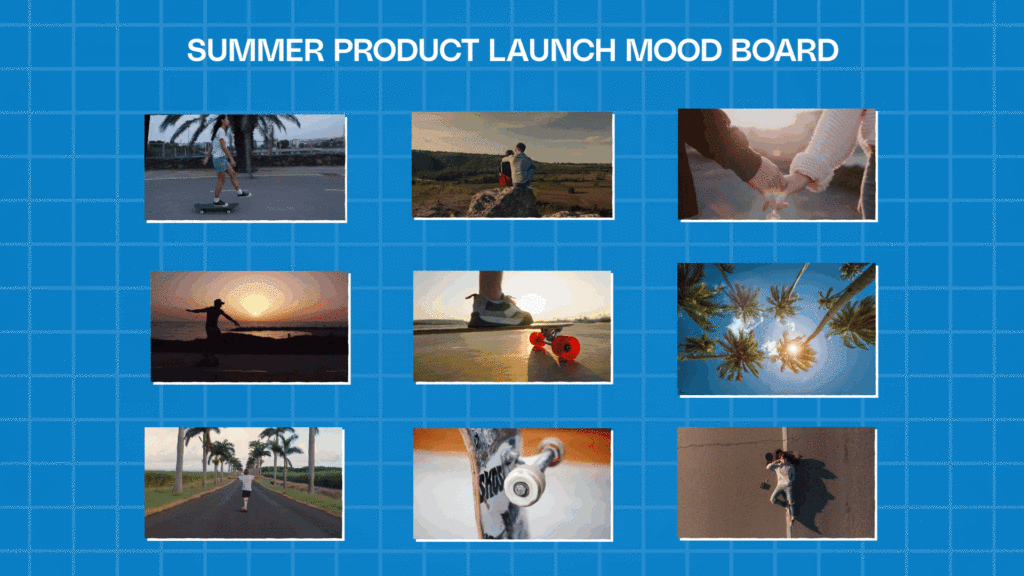
I’ve said it multiple times now, but I’ll say it one more time to really drive it home: add visuals wherever possible. Like I mentioned before, a mood board, storyboard, or reference clips can say more in seconds than a long written explanation. As you can see in the visual above, a good mood board gives you very specific visual examples of what you want to see. Providing a ten-second clip from another brand’s campaign can communicate style and tone more effectively than a page of descriptive text.
This is the same way directors pitch movies to big Hollywood studios. They compile a mood board of different movies that they will emulate and combine to tell their own story. Visuals are the single best way to communicate what you want and get your vision across.
Another important step is involving stakeholders early. If leadership or marketing teams need to approve the video, bring them in during the brief-writing process rather than after the first draft. This prevents frustrating last-minute changes that can derail production. Holding a quick alignment meeting before finalizing the brief can save days or even weeks later.
Differences between internal vs external creative briefs
Not every video brief should look the same. The level of detail you include, and even what you include, will depend on who you’re working with.

For internal creative teams, shorthand is often fine. Team members should already understand the brand, and are generally more aligned on what the company’s goals have been. So you can focus less on the finer details and more on the strategic goals and how the video supports the larger business strategy.
On the other hand, when working with external freelancers or agencies, the brief needs way more detail. Provide context about your brand, audience, and goals, along with clear creative guidelines. This ensures external partners have everything they need to produce work that feels on-brand and effective. If you have brand guidelines or a style guide that you can provide, those are worth their weight in gold when you’re working with external teams.
Mistakes to avoid when you’re putting your brief together
Even with the best intentions, it’s easy to make mistakes when writing a video brief.
Not being specific enough
One of the most common errors is being too vague. Telling a freelancer to make a text animation “make it pop” doesn’t help them understand what you’re really looking for. In fact, this type of vague messaging will probably frustrate them and lead to more questions than if you had said nothing at all.
Instead, explain what you mean with concrete examples or references. For instance, you could say: “We’d like a vibrant, fast-paced edit with animated text callouts, similar to this example:…” and then include a link to what you’re referring to.
One time, when pitching to a video agency, I sent them a link to a video that I wanted them to essentially recreate and just slapped our logo on at the end. It wasn’t the most creatively fulfilling request, but the agency knew exactly what we wanted. It led to a very efficient production pipeline that got us to the finish line with almost no revisions.
Forgetting technical requirements
Another common pitfall is forgetting technical requirements. Knowing what resolution, codec, frame rate and aspect ratio you want for the deliverable can not only save you time, but give you an immediately clearer picture of what the final video will look and feel like.
If you don’t specify that the video needs to be vertical for TikTok or Reels, you might end up with a widescreen cut that doesn’t work for your platform. Reformatting takes time, can reduce quality, and will end up costing you with more revisions.
Vague timelines or due dates
Unclear deadlines are another source of frustration. Be specific about when rough cuts, revisions, and final versions are due. A clear timeline ensures that both creative teams and stakeholders know when to deliver feedback and when to expect drafts.
When it comes to timelines and important dates, you should always overcommunicate rather than having radio silence until the day of. That way, you can stay ahead of any delays and keep tabs on how things are progressing.
Not having a distribution plan
Finally, don’t overlook the distribution strategy. A video meant for YouTube will need a different approach than one created for LinkedIn or an internal training portal. A video’s success on each platform will often be determined by how the video is framed and what type of call-outs are included in them.
For example, if your video is going to be posted on LinkedIn, having a “Subscribe” call to action or graphic on screen might be less effective than explicitly saying “Follow us on LinkedIn”. This way it lets the viewer know you aren’t spraying your content across every single platform.
Specifying the channel upfront ensures that the pacing, format, and content align with where the audience will see it.
Download your free video brief template
Now that you know what goes into a good video brief, you’re ready to create your own. Our creative video brief template is completely customizable so you can tweak and change things to suit your organization or project needs, but it includes all of the basics we covered above and tips for making sure you’re including all of the right information.
A great video starts with strong planning
At the end of the day, a great video brief is an investment in efficiency and quality. It saves time, prevents miscommunication, and ensures your final video achieves its intended purpose. Start with the template provided and adjust it to fit your organization’s workflow.
To take it further, pair the template with Storyblocks resources. Stock video clips and images are great options for mood boards or adding reference material directly into your brief. There’s more than enough visual resources in the Storyblocks library to match whatever you have in mind for visuals. With unlimited downloads from our library of over 6 million assets, you’ll have everything you need to bring your vision to life faster and more entertaining than ever before.