You’ve got the latest camera, the best lights, stellar actors, and the perfect location with permission to record there—for free! But despite so much going right, the production was a few steps away from being a certified disaster.
If this sounds familiar, there’s a good chance your pre-production planning is falling short. And when pre-production planning goes wrong, production can quickly fall apart.
The best method for ensuring that your film or video project runs smoothly is to plan and prepare for every creative variable in pre-production. Outside of a few acting cues, nothing should be left to chance. You should enter your video shoot knowing precisely what you intend to record, how you plan to capture it, and how you intend to edit it.
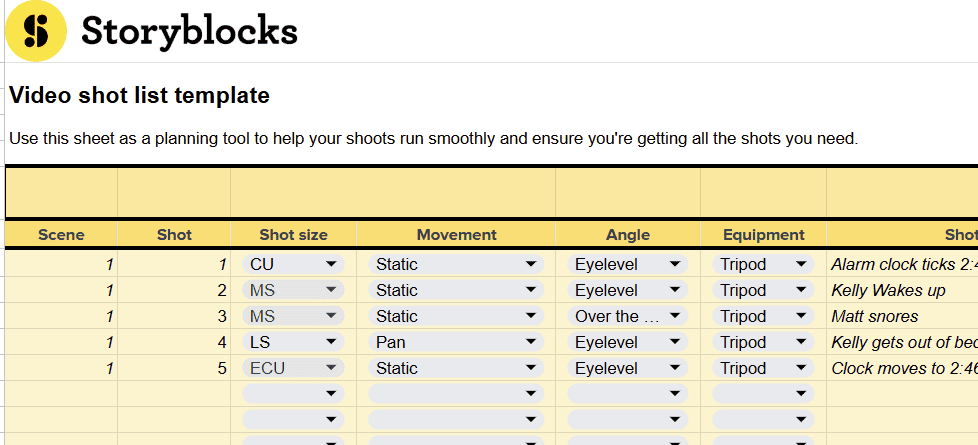
That’s where planning tools come in. And one of the most important ones is a shot list. In this article, I’ll walk you through why a shot list is an essential part of pre-production, how to use it, and how you can download your own free video shot list template.
What is a video shot list, and why do you need one?
While it’s never creatively fulfilling to spend a significant portion of your film’s creation completing administrative-type duties and sitting at your desk, the formality of a shot list is quite simple. There’s not much to it in comparison to a script, where each page can be a labor of love, or a storyboard, where the task can be somewhat tedious if sketching isn’t your strongest suit.
A shot list is essentially about taking the relevant information from the script. That way, anyone looking at it can easily identify what’s happening in the shot, the type of framing, and who’s necessary. So, why is this such an important element?
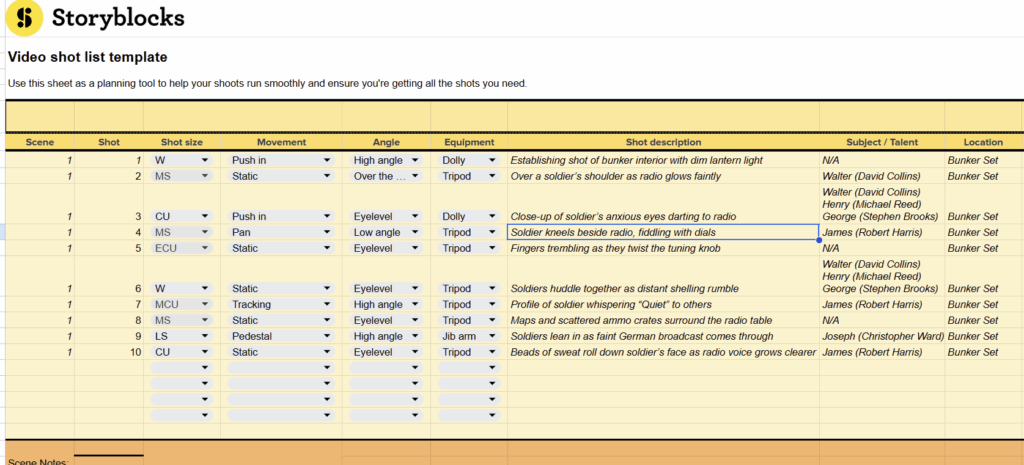
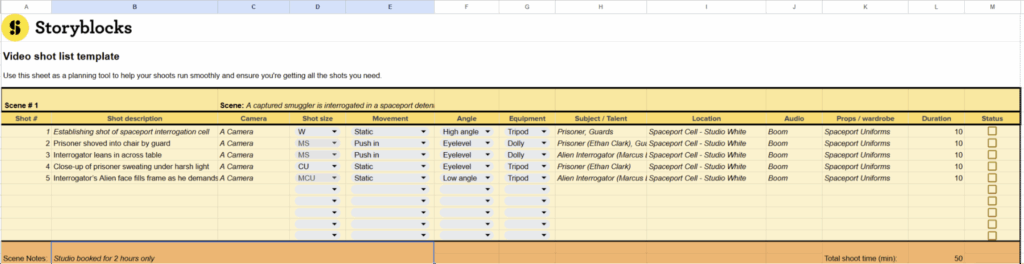
Looking at the example above, we can see it’s pretty devoid of any form of creative direction. There’s no dialogue, no information directly copied from the script, and of course, we can’t see the pre-visualization that may have been illustrated with a storyboard.
We have a list of information that clarifies the most important technical elements of the shots in a specific scene: the shot number, type, movement, location, sound, shot description, and cast. Of course, these elements can be tailored as necessary, and there isn’t one strict format to adhere to. However, the idea is that someone can look at this sheet and understand the necessities of the shots that will be filmed.
How to build a shot list
The question is, how do we withdraw the information from the script and/or storyboard to make one? Typically, we would look to do a script breakdown to isolate filmable shots within the scene. Using pencil and paper, it would look something like this:
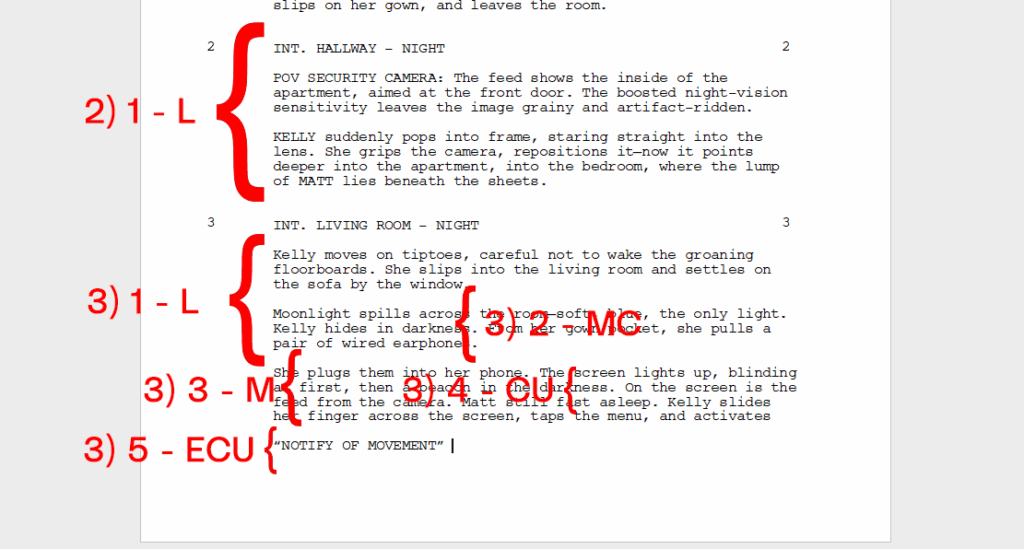
In the image above, I’ve bracketed specific areas of the script and assigned them to particular shots. Next to each bracket, I’ve added a number and an abbreviated label that indicates the type of shot I intend to use. For example, in Scene 2 (Hallway – Night), the planned shot is a long shot (1-L) to capture Kelly entering the frame and interacting with the security camera. In Scene 3 (Living Room – Night), the breakdown is more detailed:
- 1-L for Kelly moving carefully into the room,
- 2-MC (medium close-up) for her hiding in the moonlight,
- 3-M (medium shot) for plugging in the earphones,
- 4-CU (close-up) for her phone lighting up,
- 5-ECU (extreme close-up) for the screen showing “NOTIFY OF MOVEMENT.”
(If you’re unsure about camera angles, check our guide on those here)
You’ll notice that the brackets also extend and overlap each other, and this is because I intend for these shots to capture the full range of the script, allowing us to cut between the inserts as necessary.
Now, while this approach helps plan and document the required shots, it may not be immediately clear to someone just glancing at the script on the day of shooting. It’s messy, it’s not precise, and it leaves too much room for interpretation. Which can cause delays or confusion once you’re actually on set. That’s why it’s also beneficial to then take this information and translate it into a shot list.
Building shot lists for content creation
So far, we’ve been talking about shot lists for productions like films. But if you’re a content creator or someone who shoots videos on your own, building a shot list might be less straightforward. Especially if you have a looser script or your video idea isn’t completely finalized yet.
In that case, you might not be sure where to start or what shots to create. Thankfully, there are certain kinds of shots that work for almost any kind of video to help you tell a story. Like establishing shots, which help show the setting and tell the viewer where they are or where the story is taking place.
In the video below, creator Pairandetc covers the 5 shots she uses for every single video to turn her footage into meaningful scenes. So instead of filming random shots and hoping for the best, you can intentionally film shots that set you up for success when it comes to edit everything together.
Download the video shot list template
If this seems like a tedious task, there are also a handful of digital tools on the market serve as dedicated shot list template builders. But if you’d like to avoid paying a subscription fee, you can download our free template here.
The core elements of a shot list
Let’s break down some of the core elements you’ll find in a shot list. These are highly customizable; there’s not necessarily a fixed standard. And since shot lists are part of production documentation, there isn’t exactly a public library of examples from feature films online. You can proceed as you see fit.
Generally, a shot list will include:
- Scene: This refers to your scene number, which you can find in your script.
- Shot: This aligns with the shot number within that scene.
- Description: Keep this brief just the bare-bones basics of what’s happening in the shot, e.g., he places his coffee cup on the dashboard.
- Shot type: Refers to the framing, such as medium close-up, long shot, or extreme close-up.
- Camera angle: This refers to the height and tilt of the camera, as well as its position relative to the subject, such as eye level, high, low, etc.
- Camera movement: Indicates whether the camera will be static, move forward, track, etc. This can also be paired with a tech description.
- Sound: Notes whether or not sound is necessary for the shot
- Cast: Lists which actors are required for the shot.
- Location (optional): The location where the shot will be captured.
- Duration (optional): For even greater precision, you can estimate the shot duration. This is often calculated by dividing your script page into eighths, with each eighth typically equating to about 15 seconds.
Shot list vs storyboard vs shooting schedule: What’s the difference?
If you’re newer to creating video, you might be wondering what the difference is between a shot list, a shooting schedule, and a storyboard. They all sound similar, and at first glance, they share many of the same attributes. However, they all serve entirely different purposes.
From this article, we now know what a shot list is: it’s a list of the shots. A shooting schedule, however, is a plan for acquiring all those shots within a given time frame. It helps the cast and crew know when to be on set, and these schedules are usually prepared by the assistant director, who works closely with the line producer and production manager (The AD is typically the herald of keeping the production running smoothly and on time).
A storyboard, as we’ve already covered in our detailed article here, is a pre-visualization of the shots. Typically, an illustrator is brought in to sketch out the intended shots required for filming. Although a storyboard can also be nothing more than a handful of stick-man drawings if necessary.
Do you need a shot list and a storyboard?
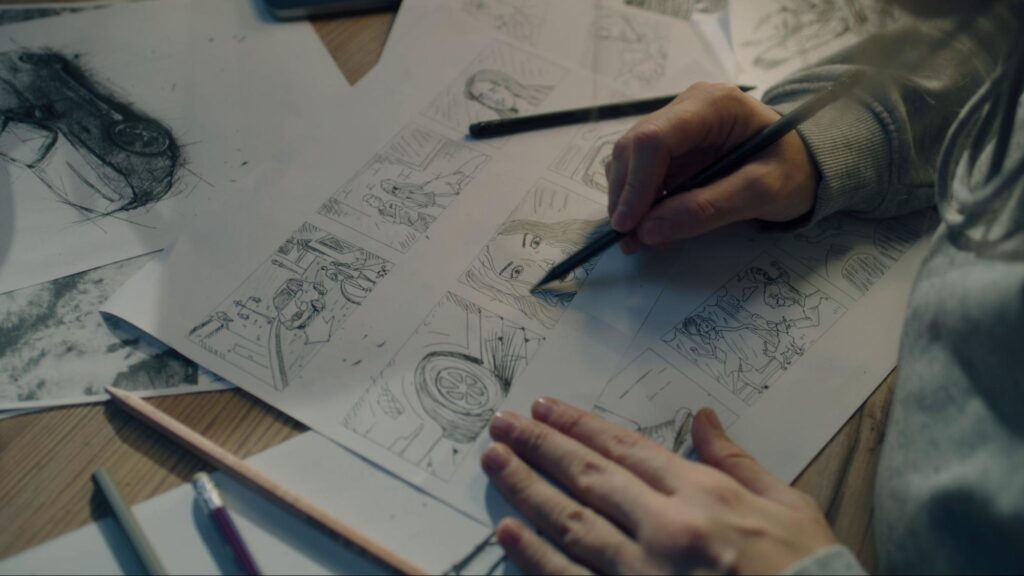
Now, you might think, “Is there a need for a storyboard after making a shot list?” However, it’s worth remembering that a shot list is a bare-bones documentation of what is intended to be captured on any given day. As a result, there is a lot of room for misinterpretation.
For example, if Scene 1, Shot 2 calls for a medium shot, there are many ways to capture it. The director might begin by focusing on a key prop in the foreground, then use a rack focus to shift attention to the characters in the background. Likewise, a medium shot with a 20mm lens will look very different from one with a 50mm lens, creating distinct levels of visual compression and depth of field.
These creative choices can’t really be demonstrated through a shot list. A storyboard helps clarify this by visually showing what the shot is supposed to look like.
Likewise, if adequately prepped with storyboards, you can take these individual illustrations, import them into your NLE, and start editing the scene before you’ve even arrived on set. This gives you the upper hand, allowing you to adjust or change shots where necessary ahead of time.
So, to summarize:
- Shot list: a list of all the shots.
- Shooting schedule: a schedule of how the scenes and shots will be captured.
- Storyboard: a pre-visualization of the shot list.
How to use your shot list on set
Let’s run through some general FAQs regarding shot lists.
Is it better to have a shot list digital or printed out?
We all know that time on a film set is vastly underestimated, and most shoots take longer than expected to finish. Generally, the process of filming a movie is a lengthy one.
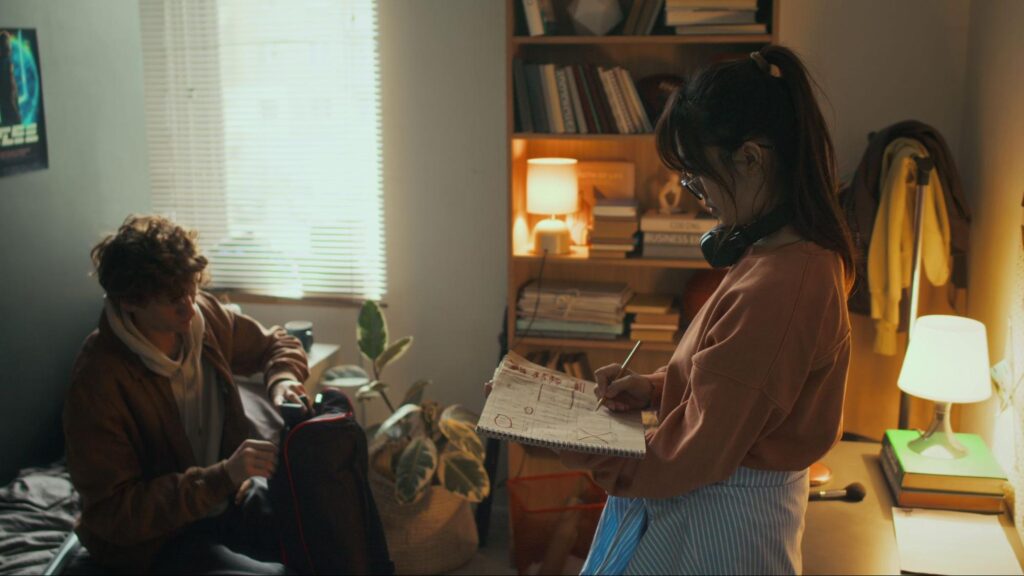
As a result, you don’t want your shot list tied exclusively to a digital device where the battery is continuously draining throughout the day. Printing your shot list multiple times, so there are spares, is always beneficial. That way, you can easily switch to another copy if one becomes damaged.
Is it worth color-coding a shot list?
As previously noted in this article, there isn’t a standardized format for shot lists, at least not in the same vein as a script. So, if you want to color-code specific elements of your shot list, then sure, go ahead. However, it’s not standard practice to do so.
Can you change your shot list during production?
Of course. A film set is a living and breathing entity, and there are many moments in famous films and television shows where an economical decision, element, or even a shot was improvised. The concept of a shot list is to create structure in an otherwise chaotic and complex job.

So if necessary, you can absolutely change the shot if the moment requires it. And because the list has been printed out, you can scribble out the original shot and make adjustments where needed.
Plan smarter, shoot better
A shot list helps you limit the number of mistakes you can make on set. When you arrive at a scene, it clearly outlines the goals of that specific sequence. And more importantly, it serves as a to-do list to keep the team on track and organized: what needs to be done, what has already been shot, and what is next.
This, in turn, creates a more efficient workflow that saves you time on set, which is the most crucial factor in filmmaking. As they say, time is money, and there is perhaps no greater example than filmmaking itself, where a simple overshoot can cost thousands.
Sometimes that means you may end up missing a shot because you didn’t allow yourself the time to stop and think about what you hadn’t yet captured. A shot list ensures this does not happen and that you will capture every shot you intended to.
However, even at this stage, if you find that you’ve missed a shot, or if it was on the shot list but couldn’t be captured due to factors like weather or sound, you can rely on our vast library of over 10 million royalty-free footage clips, music, templates, and more. Sign up today to start downloading instantly and creating better video, faster than ever.